
View/Export Form Submission Data
Viewing a form’s submissions
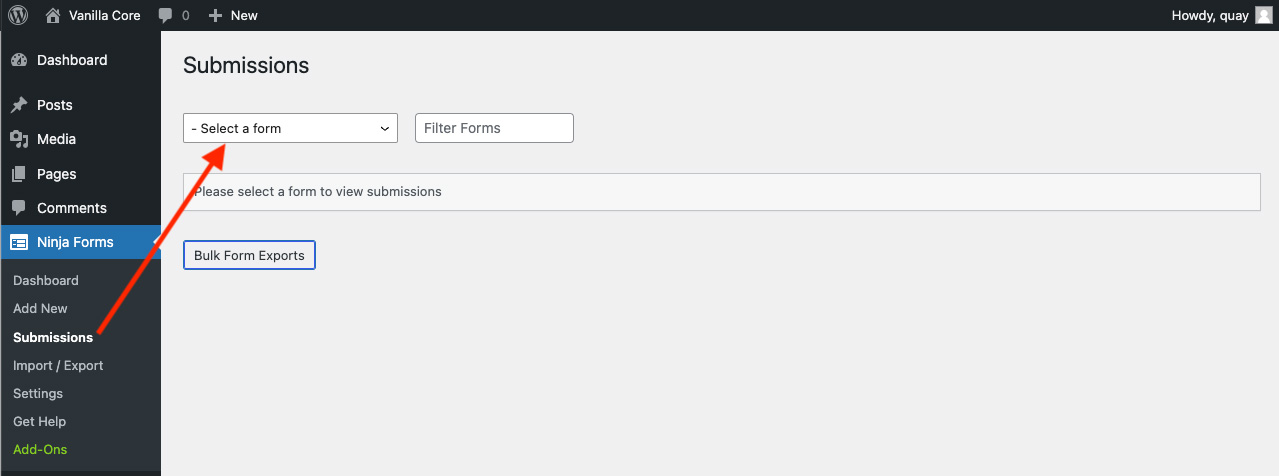
Submission data for all forms can be found under Ninja Forms > Submissions in your WordPress admin.
Note: to ensure the privacy and security of submitted data, only users with the Webmaster role can view and edit submission data by default in Ninja Forms. If you want to extend access to other roles, User Access features can be enabled and configured.
On the Submission page, use the Select a Form dropdown to choose the form you want to view submissions for.
Exporting Form Submissions
If you need a copy of some or all the information submitted through your website forms, Ninja Forms makes it easy to export your data. Simply log in to your WordPress website, navigate to Ninja Forms > Submissions, and select the form you would like to review. From there, you can view all submitted entries directly within WordPress, including contact requests, inquiries, registrations, and other information collected through your forms. This provides a convenient way to review submissions without needing to search through email notifications.
- To export a single submission only, hover over that submission and click the Export option that appears.
- To export select submissions, check the box next to the submissions you want to export. Then select Export from the Bulk Actions dropdown.
- To export all submissions of this form, just click Download All Submissions.
By default, all submissions will export as a CSV document.